
Free Download · Code-as-Video · AI Reels
Turn a topic into a finished vertical reel — with an AI presenter, sourced footage, motion graphics, captions, sound effects and music — rendered entirely as code, with zero manual editing.
1080×1920 · 30fps · Mastered to −14 LUFS · Ready for Reels, Shorts and TikTok
Built on Remotion (video as React) plus Python build scripts and Whisper word-timings, and driven by a coding agent.
What This Is
This is the engine Muhammad Zain uses to turn a topic into a finished reel. You open the folder in an AI agent — Claude Code, Cursor, or Codex — and say: “Read AGENT.md, then make a reel about [topic].”
You are not editing video, and you are not writing code. You talk to the agent in plain English and give feedback, and it does the building.
What It Does
Reels as Code
Every reel is 1080×1920 at 30fps, mastered to −14 LUFS. There is no timeline and no manual editing — the reel is built from code.
AI Presenter
Use HeyGen or any avatar and voice you prefer, with one continuous master recording for each reel, so the presenter stays consistent from start to finish.
Sourced Footage
Real clips and receipts come first, credited on screen. Proof is never faked — if a claim cannot be shown, it is not scripted that way.
34 Scene Types
Choose from 34 ready scene types, including receipts, spec sheets, comparisons, stat cards, terminals and carousels.
Word-Perfect Timing
Whisper word-timings anchor every cut to the exact spoken word, so captions and visuals land precisely when they are said.
Style Packs
Swappable looks and script voices let you change the feel of a reel without rebuilding it. The download includes two style packs as part of the engine.
What’s Inside the ZIP
Docs & Rules
- AGENT.md — the operating manual
- PIPELINE.md — the technical specification
- STYLE-RULES.md — the rules ledger
- README plus a config template
The Engine
- types.ts — the scene contract
- 34 scene components
- Reel.tsx player
- Theme tokens and fonts
Pipeline & Packs
- Python build scripts
- VO-tighten, frame-lint and capture tools
- Manim tools
- Style packs
- A real example beat sheet
What You’ll Need
You only need two things yourself:
- An AI coding agent — Claude Code, Codex, or Cursor
- An avatar and voice account — HeyGen by default, which you can swap freely; paste your IDs when the agent asks for them
Under the hood, it also uses Node, Python, ffmpeg, yt-dlp, Whisper and headless Chrome — but you do not need to know what those are. The agent checks them and walks you through.
Ships the engine, not an identity: no credentials, avatars, voice samples, or music are included. You add your own avatar and voice IDs to config.json (using the config.example.json template) and your own royalty-free music beds to public/music/.
How to Use It — Just Open It and Ask
- Open the folder in Claude Code, Codex, or Cursor — that is the whole setup.
- Just ask — for example, “How does this automation work?” or “Set this up and make a reel about [my topic].”
- Answer its questions — paste your HeyGen avatar and voice IDs, and drop in a royalty-free music track where it tells you to.
- It builds the reel — it scouts footage, writes the script, generates the presenter, renders and masters it. You watch and give feedback, such as “make the hook punchier” or “swap that clip.” Every scene can be regenerated.
Not technical? This part’s for you. Your job is directing, not coding: describe the topic, react to drafts, and ask for changes in plain words.
For technical users: you will need Node 18+, Python 3, ffmpeg, yt-dlp and headless Chrome. Then run npm install, copy config.example.json to config.json, run pip install openai-whisper, open npx remotion studio, and use the render and loudnorm commands in the reference documentation.
How It Works Behind the Scenes
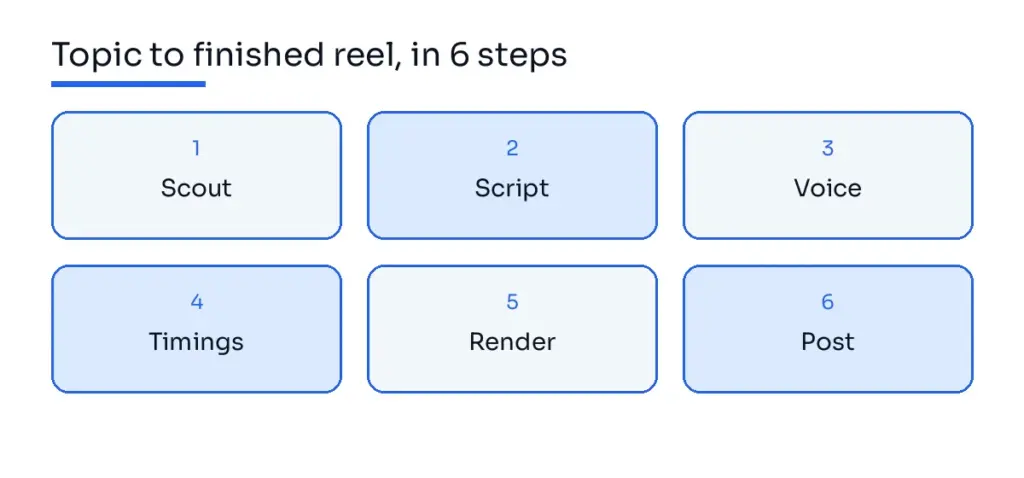
- 1. Scout — Verify the story, hunt down real footage and receipts, and build an asset manifest.
- 2. Direct — Write a script bound to those assets, so every beat maps to a real clip or graphic.
- 3. Voice + Face — Record one continuous avatar master, then use Whisper to extract word-level timings.
- 4. Beat Sheet — The build script anchors every cut to the voiceover’s words.
- 5. Render — Remotion renders the React scenes to 1080×1920 at 30fps.
- 6. Master + QC — Normalize the audio to −14 LUFS, then run a hostile-viewer critic pass.
The one rule: Never script a claim you can’t show. Source the footage first, then write to it. If an asset does not exist, re-scout or rewrite the line — never paper over the gap with a text card.
Example Prompts You Can Paste
AI news
“Make a 40-second reel about a new AI model or launch. Scout real footage for every claim before scripting.”
Tool comparison
“Compare Tool A vs Tool B. Use spec-sheet and comparison scenes, and credit third-party footage on screen.”
From your own script
“Turn this pasted script into a reel. Scout footage first, and rewrite any line you can’t show.”
Grab the Whole Engine
Docs, scene renderers, build scripts & style packs — free.
Frequently Asked Questions
What exactly is the AI Reel Automation Engine?
It is a code-based reel factory: a set of documents, scene renderers and build scripts that turn a topic into a finished vertical video, instead of a timeline you edit by hand.
Do I need to know how to code?
No. You direct the AI agent in plain English, answer its questions, and review the results. Technical users can dig into the code, but it is not required.
What accounts or keys do I need?
An AI coding agent, plus an avatar and voice account — HeyGen by default, though you can swap it freely. You add your own IDs to config.json.
Are avatar, voice, or API keys included in the download?
No. The download ships the engine, not an identity — no credentials, avatars, voice samples, or keys are included.
Why is there no music in the download?
Music was removed for licensing reasons. Add your own royalty-free tracks to public/music/.
Can I change the look and voice?
Yes. Style packs are swappable and editable, so you can change the look and the script voice to fit your brand.
What does it actually output?
A finished vertical MP4 at 1080×1920 and 30fps, mastered to −14 LUFS, ready for Reels, Shorts and TikTok.
Want this built for your business?
If you would rather have Muhammad Zain build a system like this for your business, start here: